
Every job you
ever paid for,
bolted to the car.
Log the parts, the mileage, the cost and the receipt against the VIN. The record builds up for as long as you own the vehicle, and it goes with the car when you sell it.
One vehicle, one record
Everything below ships today and works on the free plan unless marked otherwise.
- Date, mileage, work done, parts and cost
- Up to five photos or receipts per job
- Reminders on mileage or a date
- Bulk import from CSV or Excel
- PDF, Excel and CSV export
- Transfers to the next owner with the vehicle
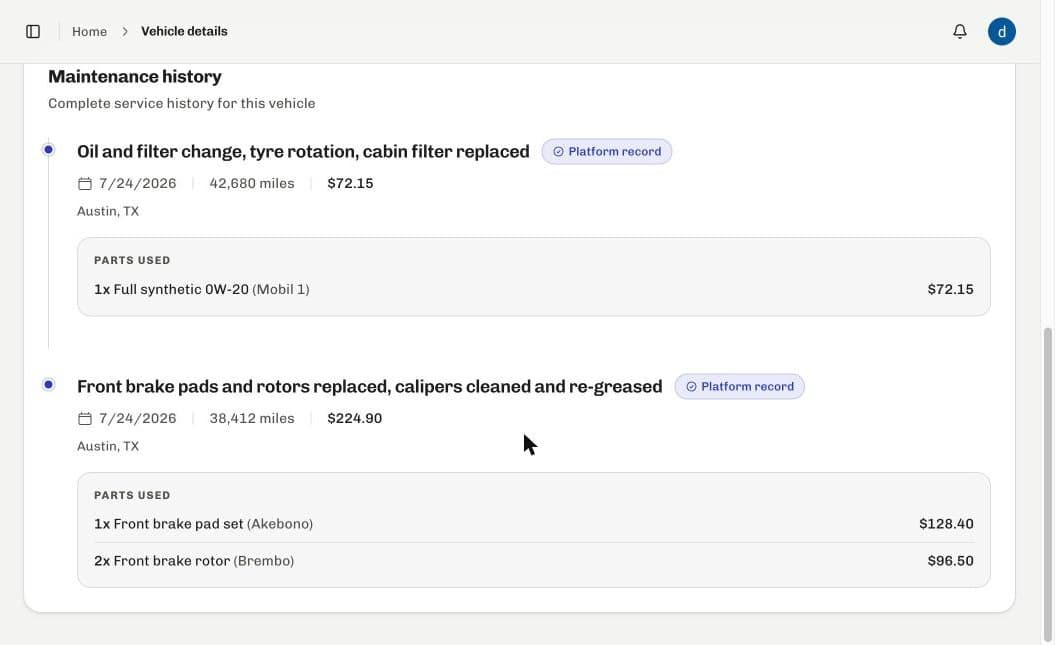
A demonstration vehicle. The records shown are sample data.
Not a claim. The actual screen.
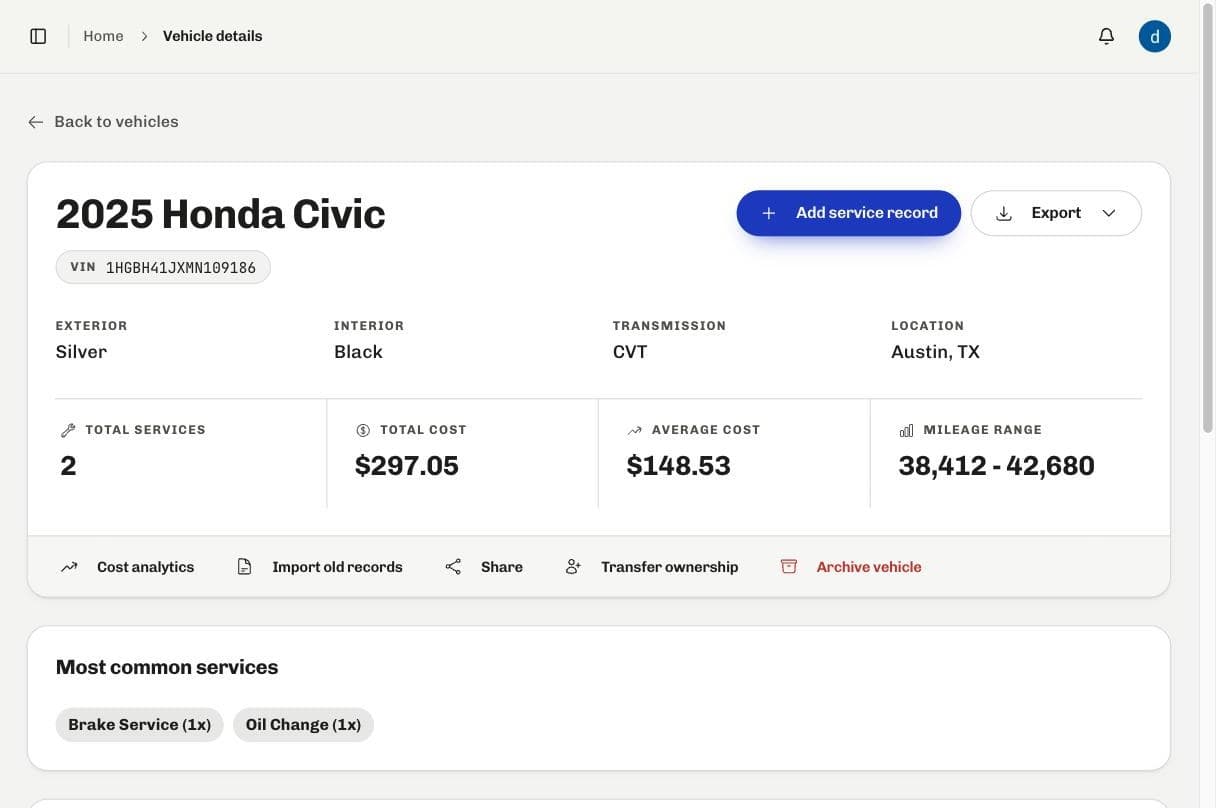
A demonstration vehicle. The record shown is sample data.
Enter a VIN once. Add to it forever.
Register the VIN
Seventeen characters creates the record. From then on every entry is keyed to that number rather than to your login, which is the whole reason the history survives a sale.
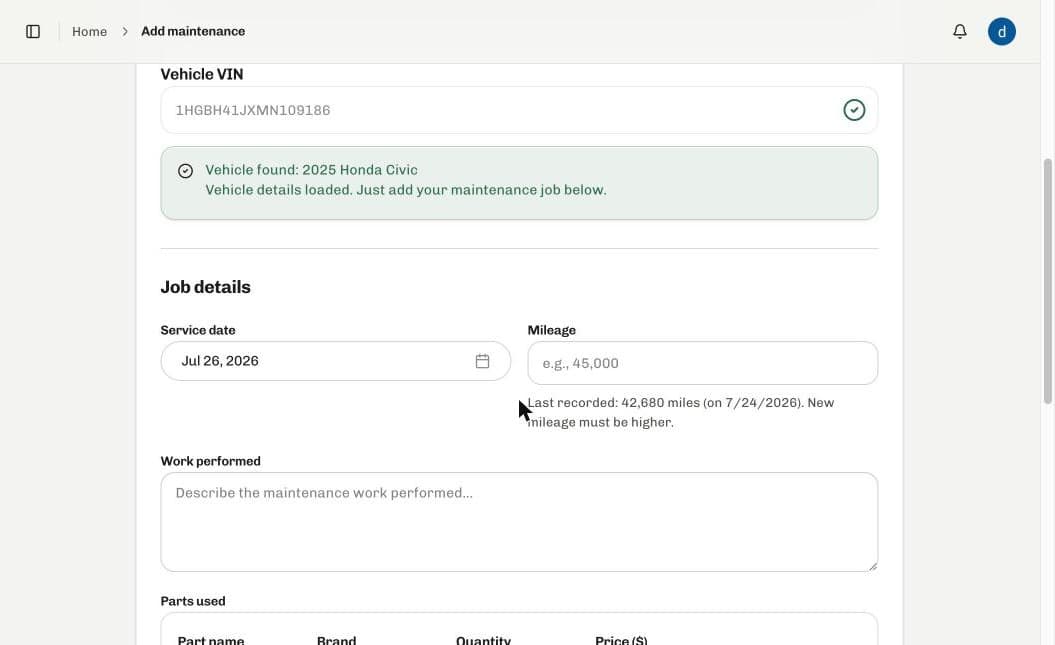
Log the job
Date, mileage, work done, parts with brand and cost, labour, and up to five photos or receipts. Whether you did it or a shop did, the entry records which.
Export it or hand it over
A print ready PDF whenever you want one, a claim PDF and spreadsheets on Premium, a share link for one vehicle, or transfer the whole record to the next owner.
All of it shipped. None of it coming soon.
In every entry
- Service date and mileage
- What the work actually was
- Parts, with brand, quantity and cost
- Labour cost and job total
- DIY or shop, with the shop name and place
- Up to five photos or receipts
- Notes, for the things that do not fit a field
Reading it back
- Every job in date order, per vehicle
- Total spend, average, and cost per mile
- Reminders on mileage, a date, or recurring
- In app notifications when one comes due
Getting records in
Premium- Bulk import from CSV or Excel
- Validation and a preview before anything saves
- Per row errors you can fix and retry
- Imported entries stay marked as historical
Getting records out
- Print ready PDF of the full history
- Insurance and warranty claim PDF
- Excel and CSV export
- A public share link you switch on and off
- Ownership transfer by email, with an audit trail
The record is not yours. It is the car's.
Every entry is keyed to the VIN, so the history does not end when you stop owning the vehicle. Transfer it by email and the next owner inherits the whole thing, with the handover recorded on the vehicle. They carry on adding to the same record.
Which is also why it holds up at the point of sale. You are not assembling a document for the occasion. You are handing over the log you have been keeping the whole time, receipts still attached.
- Share link, on or off with a switch
- Transfer by email, expiring after 30 days
- Every change of owner recorded
- Export a copy for yourself first
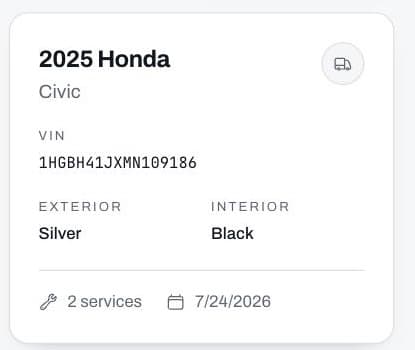
A demonstration vehicle in the garage, keyed to its VIN.
One vehicle is free. Forever, not for a trial.
Nothing you log is ever taken away, including if you downgrade. Premium is for a garage of more than one, and for bringing years of past records in from a spreadsheet.
Free
$0
for one vehicle, always
- One vehicle, kept as long as you own it
- Unlimited service entries
- Parts, labour, mileage and total cost
- Up to five photos or receipts per job
- Timeline and cost analytics
- Three active reminders
- Print ready PDF report
- Share link and ownership transfer
Premium
$10
per month, or $100 a year
Everything in Free, plus
- Unlimited vehicles
- Unlimited reminders, with email alerts
- Bulk import from CSV or Excel
- Excel and CSV export
- Insurance and warranty claim PDFs
- Priority support
Cancelling keeps access to the end of the period you paid for, and downgrading never deletes anything.
One permanent service record per vehicle, keyed to its VIN. Each entry holds the date, the mileage, the work done, the parts with brand and cost, the labour, any notes, and up to five photos or receipts. Entries are marked as either logged in the app or imported from your own history, so the two never blur together.
No, and you cannot delete one either. A saved entry is permanent, which is the whole point: a history its owner can quietly rewrite is not evidence of anything. You confirm each entry before it saves, and if you need to correct one later you add a further entry that says so, the way a ledger works.
Yes, and it is a normal first session rather than an edge case. Bulk import reads CSV and Excel up to 5MB, validates every row before anything saves, shows you a preview, and reports errors per row so you can fix and retry. Imported entries stay marked as historical.
It goes with the vehicle. Everything is keyed to the VIN rather than to your account, so you can transfer the record to the next owner by email. They inherit the full history and carry on adding to it, and the handover is recorded on the vehicle. You can export a copy for yourself first.
Set a trigger on mileage, on a date, or as a recurring interval, and RepairFyX notifies you in the app when it comes due. Free keeps three active at a time. Premium removes the limit and adds email alerts.
A print ready PDF of the whole record at any time. Premium adds a structured insurance and warranty claim PDF, plus Excel and CSV. The data is yours and it leaves in formats you can open without this product.
Yes. Each vehicle can have a public share link that you switch on and off yourself. It is off by default, and switching it off revokes the page.
Nothing is deleted. Access runs to the end of the period you have paid for, then the account returns to free and you choose which single vehicle stays active. Every record is still there if you upgrade again.